Google Expands Test Of AdWords That Collect Email Addresses

In the last couple of weeks, we’ve seen significantly more people reporting they’ve seen AdWords that allow advertisers to collect email addresses directly in the ad unit. Now Google has confirmed it has expanded the trial of the lead generation format to additional advertisers.

We’ve seen the format used by daily deal provider bloomspot, which also collected ZIP codes via the form, presumably to add subscribers to the appropriate city-specific deals newsletters. Email service providers like AWeber and Vertical Response also seem to be trying out the format. Previous versions of the test included the ability for users to request phone calls from marketers, as well.

A Google spokesperson sent a statement reading: “This ad format is still in testing phase, but our team is getting a lot of interest from advertisers and we’ve been slowly expanding the trial over recent months.  These ads help businesses gather new leads and enable users to easily get relevant information and ask for quotes.”

Indeed, the format seems designed for marketers peddling high-consideration goods or services, which often require significant nurturing and follow-up by a salesperson. On the consumer side, one could seem them being useful for car manufacturers and retailers, and business-to-business leads seem a natural use case

Filed under  //  ads   data mining   dynamic search ads   google   ppc   search  
Comment (1)
Posted by tigh 

Goodbye Google Buzz....

Google Buzz is going away, but your posts are yours to keep

In a few weeks we'll be retiring Google Buzz. At that time you won't be able to create any new posts, but your existing content will remain accessible in two ways:

  1. You can view it on your Google Profile
  2. You can download it using Google Takeout

Thank you for using Google Buzz.

Filed under  //  buzz   google   social   tech  
Comment (1)
Posted by tigh 

Google+ To Integrate With Blogger | TechCrunch

blogger-logo

Up-and-coming social network Google+ will soon be integrated with Google’s blogging platform, Blogger, according to a message now appearing in the “Edit User Profile” section of Blogger’s Settings.

The message reads “Connect Blogger to Google+ : Use your Google profile and get access to upcoming Google+ features on Blogger,” and includes links to “Learn more” and ”Get Started.” Unfortunately, the links are dead-ends right now, so we don’t yet know what type of integration is being planned.

The “Learn More” link is currently dumping to this “page not found” message in Blogger’s Help Center, while the “Get Started” link simply redirects logged-in users to their Blogger Dashboard.


Filed under  //  blog   blogger   content   google   media   platform  
Comment (1)
Posted by tigh 

ApartmentHomeLiving Increases Conversions 50% Using Dynamic Search Ads Instead of 15,000,000 Keywords

Google is opening wider a beta test of Dynamic Search Ads, an interesting new type of AdWords ad for larger advertisers that eliminates the need for keywords.

With this ad type, designed for retailers or other advertisers with large, often-changing inventory, Google automatically generates ad copy — based on the advertiser’s template — by looking at the content in the advertiser’s Web site. Google also automatically displays the ad in response to search terms it thinks are a good match, without the advertiser having to select keywords. Google has been using a similar no-keywords approach in its program for small local advertisers, AdWords Express.

For Dynamic Search Ads, advertisers input their Web site URL or the URL of a range of pages on their site — say, a retailer wanted to promote their women’s clothing — and select a bid price based on the value of that category to them. Google then continually crawls the Web site so it knows when inventory changes, and can theoretically respond with relevant ads more quickly than the marketing team that’s manually creating keywords and ads. The system is also designed to keep on top of changes in the types of queries people are performing — Google says 16% of searches every day are new.

In an effort to keep this from impinging on advertisers’ existing campaigns, the system will hold back the dynamically generated ad in favor of advertiser-created copy, if the advertiser already has a campaign targeting the specific search term.

“We want to make sure it doesn’t affect keyword campaigns,” Baris Gultekin, director of AdWords product management, told me. “This is purely incremental.”

Gultekin says the company will provide advertisers with reporting on search terms that generated clicks, the matched destination pages and ad headlines generated, average CPC, clicks and conversions. Advertisers may optimize by adjusting a max CPC bid.

The new ad type has been in development for two and a half years, and “a couple hundred” advertisers across a variety of verticals have already been testing it. Gultekin says advertisers on average are seeing 5-10% increase in conversions with a positive ROI.

One advertiser in particular — ApartmentHomeLiving.com, a real estate Web site with constantly changing inventory — says it saw a 50% increase in conversions at an average cost-per-conversion that’s 73% less than their normal search ads. The company is already a seasoned search marketer with campaigns of up to 15 million keywords.

Dynamic Search Ads are available in all languages and all countries currently, but only to advertisers in the limited beta. The company is soliciting inquiries from customers that might be interested in participating in the beta in order to widen its reach.


Filed under  //  ads   dynamic search ads   google   marketing   search  
Comments (0)
Posted by tigh 

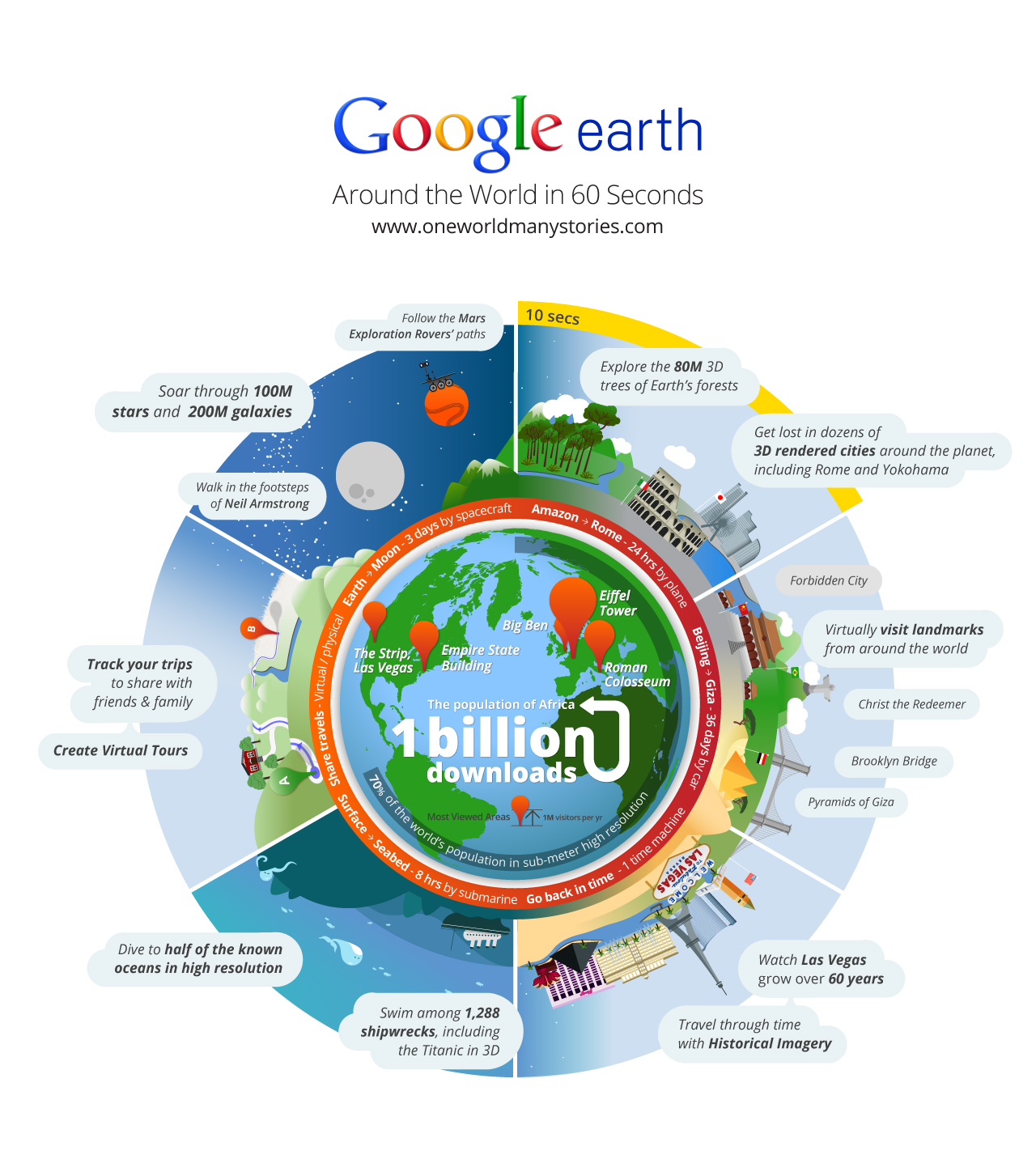
A Billion Google Earths

Media_http3bpblogspot_wthnt

Filed under  //  apps   google   googleearth   infographic   mapping   tech  
Comments (0)
Posted by tigh 

Get Google+Facebook (FB Feed in your Gplus)

Media_httpstaticcross_whcue

Post and access your Facebook feed from Google+ (it's a chrome plugin).

Filed under  //  apps   facebook   google   search   social  
Comments (0)
Posted by tigh 

What Do You Love? I love Google!

Google just quietly launched a meta-Google product search engine at http://www.wdyl.com/ Explore anything form Google pictures (previously Picasa), to Google Alerts, to Gmail, to Google Trends to YouTube, to Blogger Blogs to Gmail to Google Earth.  I know all the buzz has been about Google+, but What Do You Love is pretty cool. 

Tigho_wdyl
So honestly, I think I love Google.

Filed under  //  apps   cool   google   search   wdyl  
Comments (0)
Posted by tigh 

‪Google Launches Mobile Sites‬‏

Google just announced a free, templated mobile landing page creation tool called Google Sites.
This has been overshadowed by the Google+ frenzy, but I look forward to checking it out!

Going mobile made easy

Get started in minutes, not days

Yes, your mobile site really can be up and running in just a few minutes. No coding skills required!

No cost, no worries

Google Sites isn’t just easy to use – it’s also free.

Measure and optimize your results

With Sites, you can study in depth how your visitors use your mobile website using Google Analytics.

http://www.google.com/intl/en/images/logos/sites_logo.gif

Filed under  //  google   mobile   video   webdev  
Comments (0)
Posted by tigh 

Social Media and Search

Is Social Taking Over Search

Really interesting Page Level Social Metrics from SEOmoz... and a little bit of Seth Godin.

Filed under  //  facebook   google   media   search   seo   seomoz   sethgodin   social   tech   twitter  
Comments (0)
Posted by tigh 

How To Use Google Plus

Waiting for a Google Plus invite? Google is rolling out the service in waves and you can expect it to become a ubiquitous social option in the coming months. We have been playing with the service since getting invites yesterday and there are a lot of things to like about Google's new social initiative.

Unlike Google's last big invite-only rollout of a social initiative - Google Wave - users will not be confounded on just what the heck you are supposed to with the service when signing up for the first time. From Friendster, Friendfeed, MySpace and Facebook, users are familiar with how a social platform is theoretically supposed to look. At its core level, Plus is not that much different. Yet, there is so much more. How do you get started with Google Plus? Let's break down the nuts and bolts.

Alcatel-Lucent With the launch of the Alcatel-Lucent Developer Platform, Alcatel-Lucent provides service providers and enterprises with tools that enable third-party developers to build, test, manage and distribute applications across networks, including television, broadband Internet and mobile.

Ad powered by BTBuckets

Create Your Circles

Imagine the ability to break down Facebook into its various constituent parts and keep them separate from each other as opposed to one giant feed. That is what Google has done with Plus. There is one main stream where all your friends updates show up then the option to see updates from only certain groups like "Work," "Friends" or "Family." This is the essence of Circles.

From the initial interface, you will see four buttons - Home, Photos, Profile and Circles.

Go_To_Circles.jpg

The first thing you are going to want to do is set up your circles. Click on the tab and it will bring you to a interface where all of your contacts in Gmail (not just Gmail addresses, but all of your contacts) are listed in a panel on top of the screen. Below is a panel that has your various circles. To add a contact to a circle, drag from the top of the list to the appropriate group. Contacts can be added to multiple circles.

Google_Plus_Circle_Drag.jpg

One of the initial problems I had from the circles interface was that I added a couple of "Friends" into my "Work" circle and could not figure out how to get them out. You can do this from the user streams by hovering over the person's name and hovering over "Add to circles" and clicking the appropriate boxes. Yet, from the circles interface, that was not readily apparent. To take people out of a circle, hover above the circle, grab their icon and drag it back into the people plane.

One of the great differentiators between Twitter and Facebook is the "unbalanced" or "balanced" follow. Facebook was initially a two-way follow paradigm - I friend you, you friend me and we see each other's updates. This has been changed with the ability to "like" groups, brands and pages without them following you back. Twitter has always been a one-way follow - I follow you and you do not necessarily have to follow me back.

This line has been blurred in circles. If a person is in your contacts, they can be added to a circle and will get a notification that has happend (but not what circle they have actually been added to). There is also a "follow" circle. Just like Twitter, you can follow people and see their updates without them having to follow you back. As your circles evolve this could allow to track different interests, like Twitter lists.

Google_Plus_Circle_Add.jpg

The Stream and "Bumping"

Once you have set up your circles, go back to the Home screen to see the results. Below the profile picture you will see the choices of stream. You can view your entire stream at once (à la Facebook) or by particular circle.

Google_Plus_Main.jpg

There are two other options below your circles - Incoming and Notifications. Clicking incoming will bring you to messages that have been sent by people outside of your circles. Notifications will show you when people in your circles have commented on something you have posted, or something you have commented on.

Below the circles and notifications there is a tab dubbed "Sparks." More on that below.

One of the killer features of Gmail, or any Google product, is Chat. It has made its way into Plus and sits in the familiar left-hand, bottom-right portion of the screen that it is found in Gmail. Users with a lot of Circle and Chat contacts will like the ability to enable chat for particular groups. Want to surface friends and family but not acquaintances? Plus will let you do that.

If you are using Plus in a Chrome browser, desktop notifications do not pop up when someone sends you a message like it would in Gmail.

Posting a status update in Plus is not like sending a Tweet or updating Facebook. The core functions of an update are present - photos, links, video and location - but when you hit "share" it doesn't automatically post your message to everybody in your circles. You have the option to decide which circles your update is posted to, from individual groups to all circles, to extended circles, or just a single person.

Google_Plus_Chat_Circles.jpg

An interesting feature in the user stream is that conversations will surface back to the top of the feed when subsequent comments are made on a thread. This, according to Google developer Jean-Baptiste Queru, is called "bumping." Google Buzz has this same capability and it was also a feature of FriendFeed.

Photos

Photos in Plus are relatively self-explanatory. Users can update photos from their computers or from their phones, see photos that people in their circles have uploaded. With the Android app, there is a way to upload any photo that you take with your phone straight to Plus, an interesting if slightly disconcerting feature.

When you add a photo, it will prompt you to create an album. Once that album is created it will ask which of your circles you would like to share it with. This is a prime differentiator from Facebook where all of your photos are visible to all of your friends by default (you can change who can view certain photos in Facebook preferences). You can also pick an individual to share photos with instead of an entire circle.

Photo uploading is easy within Plus. Just like adding a picture or an attachment to a Gmail document, you can drag-and-drop from your desktop or click the on the upload button and browse your computer for pictures.

Google_Plus_Photo_Drag.jpg

Users can also add photos by posting them in status updates or by uploading them through the Profile tab.

Profile

If you use any Google products and have a Google account, you have a Google Profile. Profiles are unknown to most of the Internet because, until now, it was relatively useless to anyone but Google.

Your Google Profile is now the hub of you Plus experience, the backbone that everything else is built upon. There are six tabs in your profile page - posts, about, photos, videos, +1s and Buzz.

Google_Profile_Dan_Plus.jpg

A significant change to your profile page is that there is now a location where your +1s live. Until now, when you clicked +1 on content on the Web, nothing happened. The information was sent to Google and integrated into some type of esoteric search algorithm. Users can now see what people have +1ed through their Google Profile. Unlike the Facebook share/like/recommend buttons, it does not go straight into your stream but rather to the profile page.

Sparks and Hangouts

Hangouts is a new feature rolled out with Plus. Essentially it is an area where your circles or a select group of friends can video chat all on one screen. To start a Hangout, go to the "Welcome" button in the home tab. It will prompt you to start a hangout and invite individuals or entire circles. Up to 10 people can be in a hangout at once and it will be seen in that circle or users' stream.

Plus_Hangouts.jpg

Sparks is the part of Plus where you can find content on the Web that you are interested in. In the "Field Trial" version of Plus, it looks like Sparks is a randomized version of content and news generated through Google News. Sparks can be a dashboard for things you are interested in on the Web. When you do a search in Sparks, it will predict what you are searching for with a drop down menu (like old Google search, not quite like Google Instant). You can pin particular topics you search for to the Sparks dashboard for quick access.

You can share articles found in Sparks with a share button on the bottom of every article that surfaces in a search. Like everything else in Plus, it can be shared with a specific person, circle, group of circles or the general public.

For more information, check the videos that Google made explaining Plus and all of its aspects -- Circles, Hangouts and Sparks.

Filed under  //  apps   cool   facebook   google   googleplus   social   tutorial   twitter  
Comments (0)
Posted by tigh